
Password vault
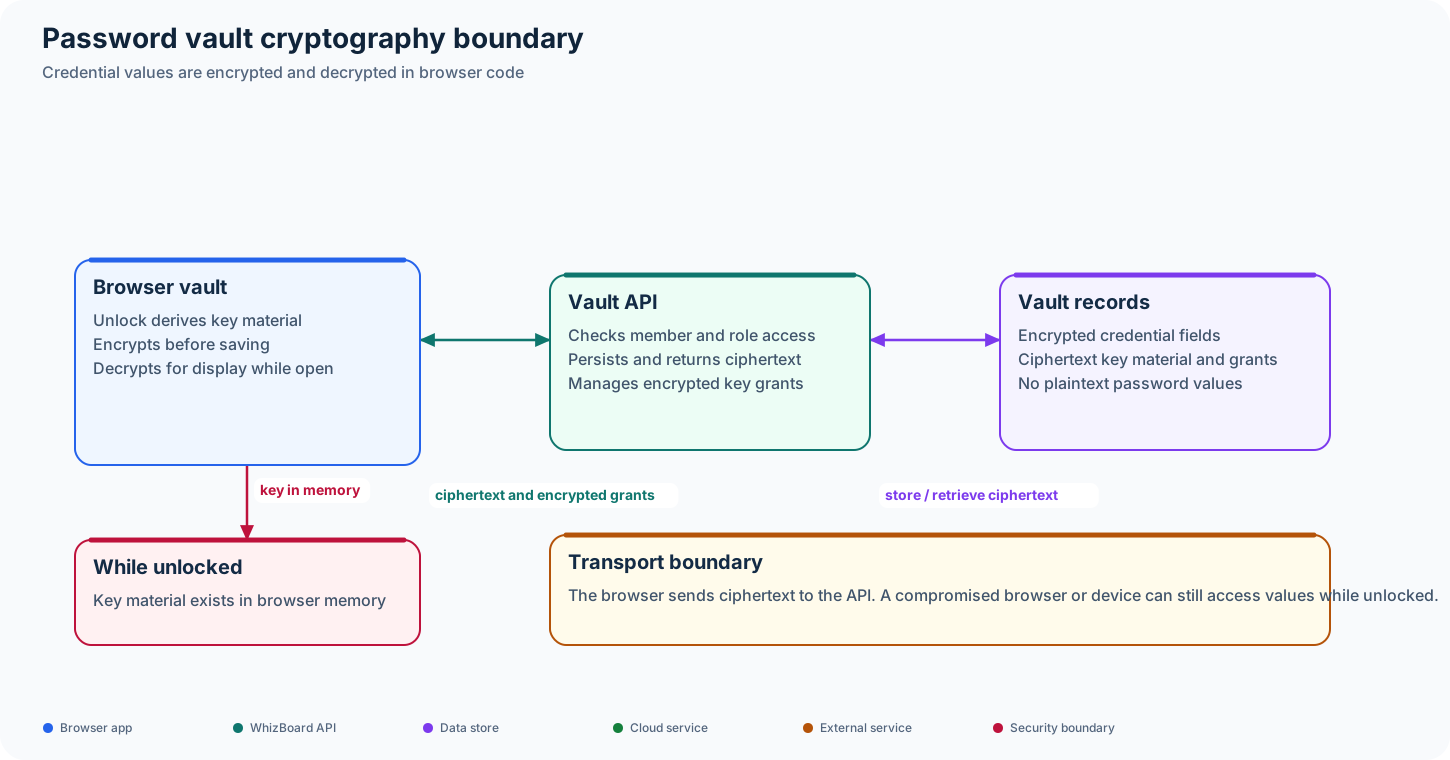
WhizBoard’s password vault performs credential encryption and decryption in browser code. The API persists encrypted credential fields and vault key material; it does not need to decrypt the stored password values to save or return them.
Status: Implemented in the UI and API. A member can use firm vault data only when the relevant encrypted key grant and API permissions are in place.
Unlock and use a vault
- The user unlocks the vault with their account password. Browser code derives the key material needed to access the encrypted vault.
- The browser retrieves encrypted vault data and any key grants available to that member.
- Credential values are decrypted in the browser for display or use. When a value changes, the browser encrypts it before sending the update to the API.
- The API stores ciphertext and associated vault metadata. It does not receive plaintext credential values as part of the vault record.
Firm vault access can be granted to members through encrypted key grants. Staff configure firm vault items and grants; clients can submit credentials for staff review. These role-specific workflows are enforced by the API and the UI.
Security boundary
The API can enforce who may read or change vault records, but browser code holds the unlocked key material while the vault is open. This guide describes where the current implementation performs encryption; it is not a claim that a compromised browser or device cannot access unlocked values.
Code map
- UI cryptography, unlock state, and API adapter: WhizBoard UI,
src/lib/vault-crypto.ts,src/lib/vault-session.ts, andsrc/lib/vault-api.ts. - API vault routes and persistence: backend,
src/routers/vault.py,src/controllers/vault.py, andsrc/models/vault.py.