
Notify and reminders
The Notify area lets members create, review, update, and complete reminders. Reminder records and in-app notifications are handled by the API. A separate dispatch step is required for due reminders to produce notifications and email.
Status: Reminder management is implemented. Scheduled delivery requires an external dispatch job; email also requires provider configuration.
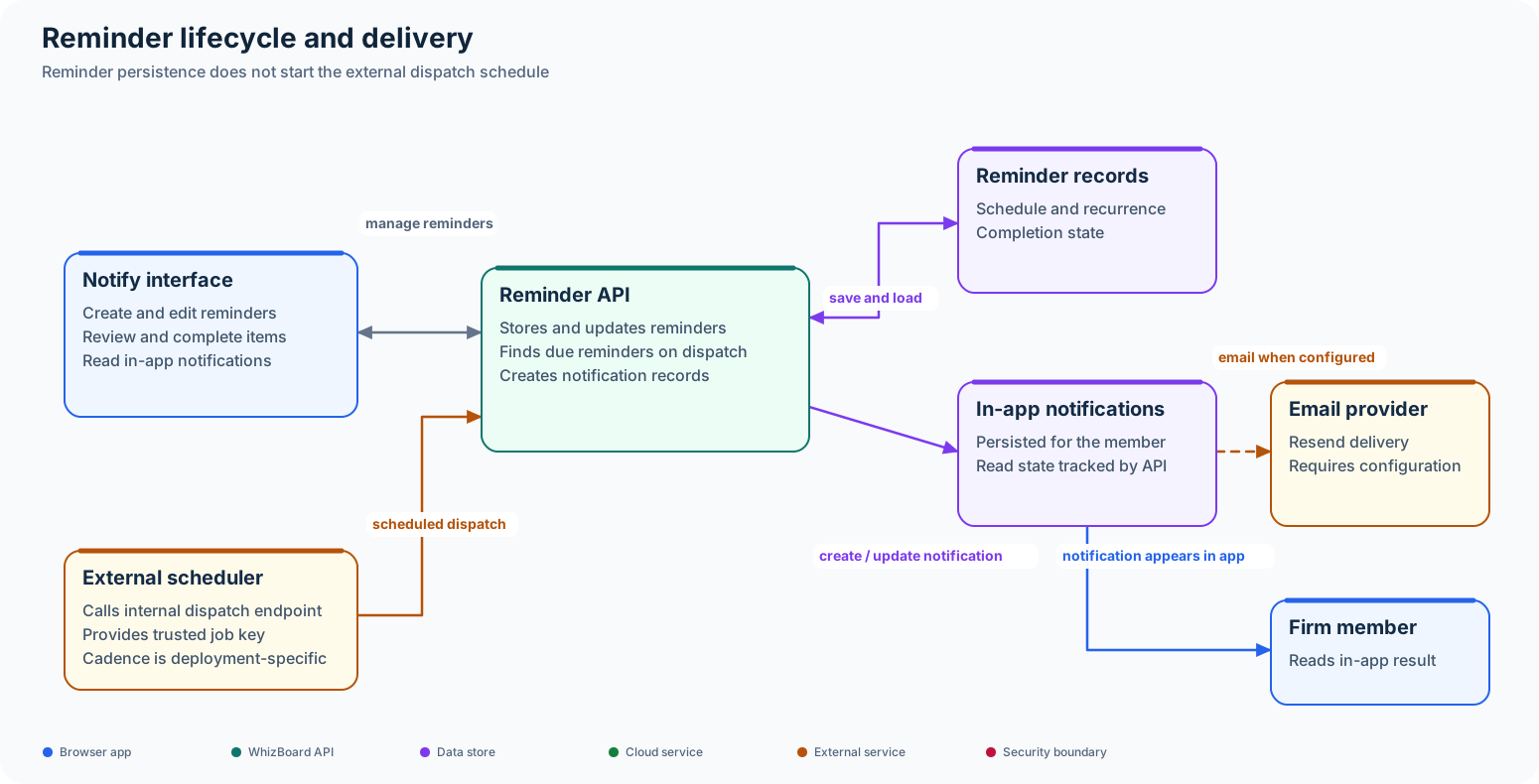
Reminder management
The API stores firm reminders and supports recurrence and completion. The UI presents notification views and lets a member mark notifications as read. Reminder management can work independently from scheduled delivery; a saved reminder does not prove that a scheduler is running.
Scheduled dispatch requirement
Due-time delivery requires a trusted external scheduler or task runner to call the internal endpoint /api/v1/internal/jobs/reminders/dispatch with the configured job key. The backend then processes due reminders, writes in-app notifications, and can send email through Resend.
The repositories do not establish which scheduler invokes this endpoint or how often it runs. Deployment owners must configure and monitor that job. The API process does not start the reminder dispatcher on its own.
Code map
- UI Notify adapter and views: WhizBoard UI,
src/lib/notify-api.tsandsrc/components/firm/notify-main.tsx. - Reminder and internal dispatch routes: backend,
src/routers/reminders.py. - Persistence, recurrence, and dispatch service: backend,
src/models/reminder.pyandsrc/services/reminders.py.